How to make a music video on your phone
To make a music video on your phone, film three or four full takes of yourself performing the song, each in a different spot, with the track playing out loud. Then line every take up with the song and switch between them on the beat. Stalak does the lining up and the cutting for you, free, in your browser.
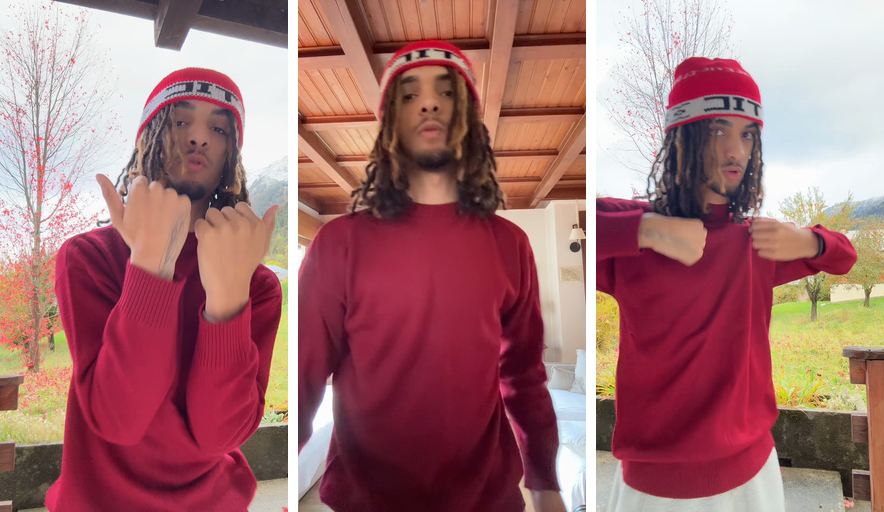
Before: 3 takes
After: Stalak’s edit
What do you need to make a music video on your phone?
A phone, your song as an audio file, and something to hold the phone still: a shelf, a stack of books or a small tripod. Add a way to play the song out loud while you film, like a speaker or a second phone. That’s enough to make the whole video alone.
- The song: the final version as an MP3, WAV or M4A file. A video works too, if it has the song as its sound.
- Two or three spots you can reach in one session: your room, a hallway, a balcony, the street outside.
- Light: daylight from a window in front of you is the easiest good light you’ll find.
How do you plan a music video by yourself?
Decide what you’re posting before you film. For TikTok, Reels or Shorts, pick the 10 to 30 seconds people will replay, usually the hook or your best bars. For YouTube, plan on the whole song. Then pick your spots and keep one outfit, so the cuts read as one video.
- A close shot, head and shoulders, for the lines that matter most.
- A wider shot that shows the place and the outfit.
- A different angle: from the side, from below, or with the phone lower than your face.
Three spots with one take each already give the edit three looks to switch between. A second take in each spot, closer or wider, doubles that.
How do you film a music video on your phone?
Film each take from the first word to the last, with the song playing out loud, so your lips follow the real track. Keep the phone still, face the light, and do at least three takes in different spots. Full takes let the edit switch to any take at any moment of the song.
- Start recording a couple of seconds before the part, and stop a couple of seconds after it.
- Perform every word at full voice: a quiet lip-sync shows on camera.
- Wipe the lens before each spot. A thumbprint makes the whole take look soft.
- Turn on Do Not Disturb, so a call or a notification doesn’t stop you in the middle of a take.
- Film vertically for TikTok, Reels and Shorts. Film horizontally only if the video is just for YouTube.
- The back camera is usually the sharper one. Do a short test take to check the framing before you start.
How do you edit the takes together?
Put the song on a timeline, line each take up so the mouth matches the audio, then switch takes on the beat. By hand, lining up means matching each take’s sound to the song, one take after another. Stalak does the lining up and the cuts for you as soon as you add your takes.
- Keep the song as the sound. The phone’s microphone only helps to line the takes up; the finished video should carry the real track.
- Cut on the beat. Switching takes at the start of a bar feels natural. Quick cuts suit the hype parts, longer shots the calm ones.
- Add your lyrics. With the lyrics on screen, people can follow your bars even with the sound off.
Should you film vertical or horizontal?
Vertical (9:16) for TikTok, Instagram Reels and YouTube Shorts, horizontal (16:9) for a music video on YouTube. Stalak exports 9:16 videos at 1080 × 1920. Its Music video mode (export with Stalak Pro) makes the 16:9 version at 1920 × 1080, and shows vertical takes whole, in the middle, over a blurred copy of themselves.
Stalak in one minute
Here’s each step in Stalak at phone size, with the takes from the example above.
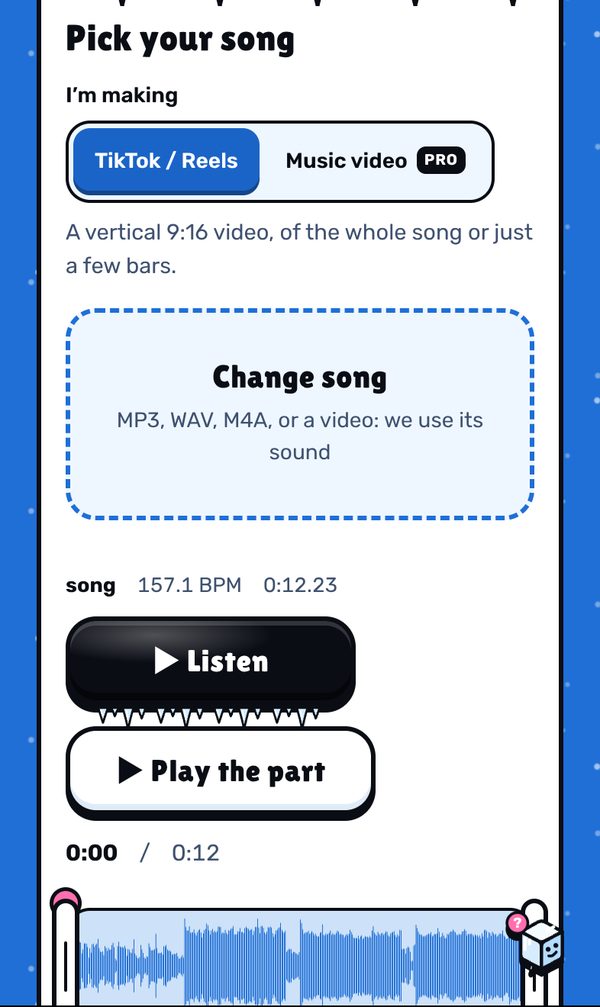
1. Pick your song. Drop the file: Stalak finds the tempo. Keep the whole song, or drag the handles to keep just a part. 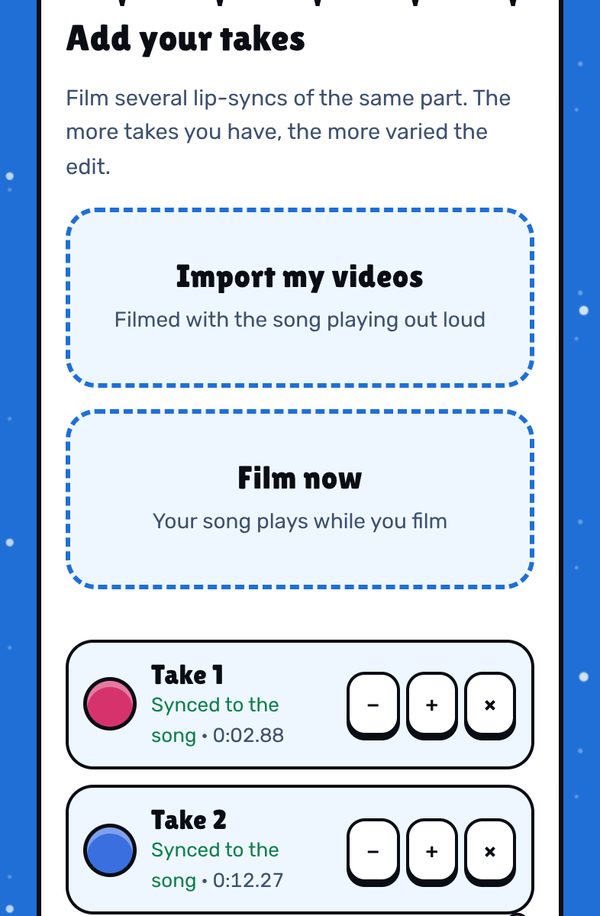
2. Add your takes. Import the videos from your phone, or tap Film now and the song plays while you film. Each take shows “Synced to the song” once Stalak has lined it up. 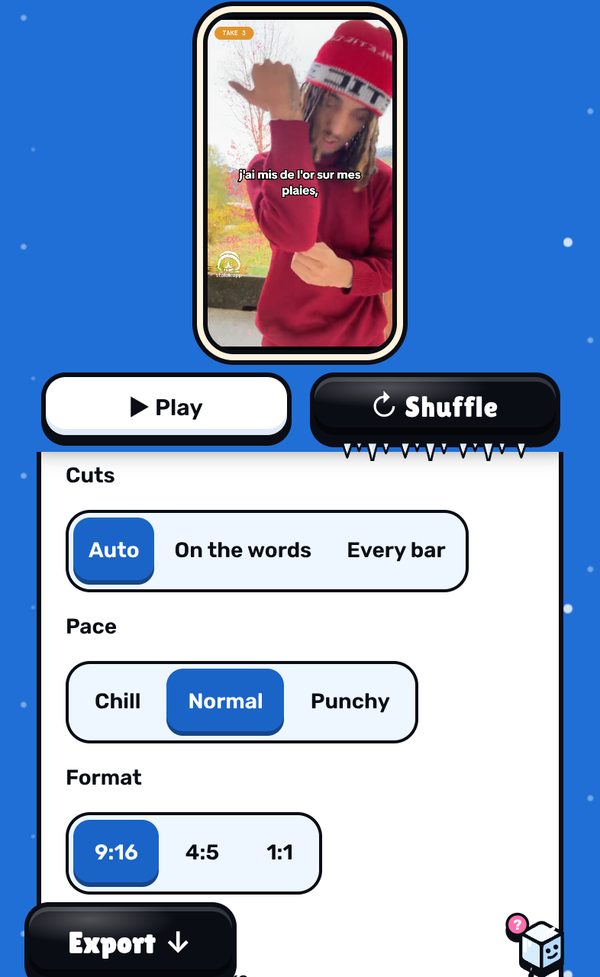
3. Lyrics, then the edit. Paste your lyrics and tap to sync them, or skip. Stalak cuts on the beat right away: pick the cuts (Auto, On the words, Every bar) and the pace (Chill, Normal, Punchy), or tap Shuffle for another edit. 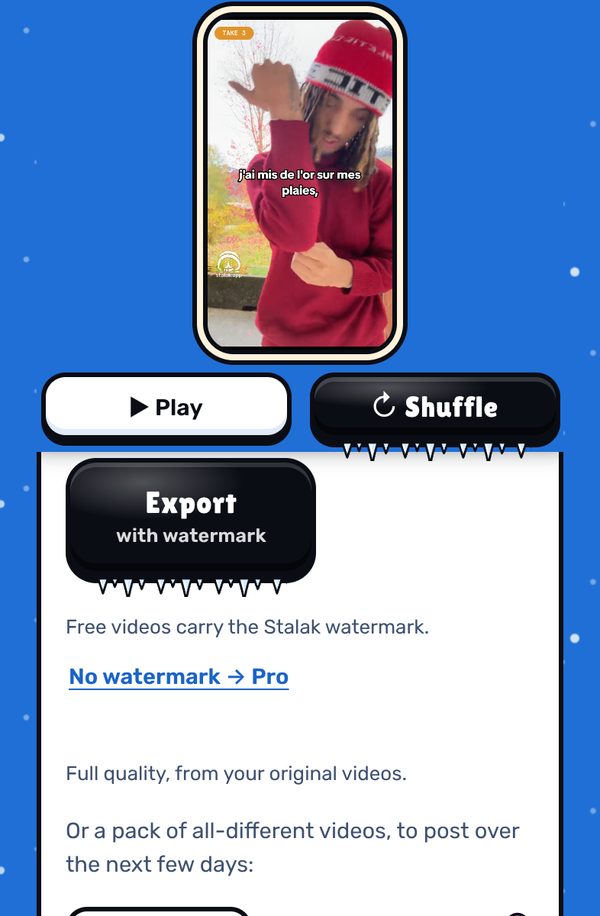
4. Export. The video is made on your device, in full quality from your original files. Free videos carry a small watermark; Pro exports without it.
Free, in your browser. No sign-up.
What’s free, what’s Pro
- Free: unlimited videos, auto cuts, lyrics one line at a time, 3 filters, 9:16 export, no ads. A small watermark (our mascot and stalak.app) on every video.
- Stalak Pro ($7.99/mo or $49.99/yr): no watermark, 16:9 music videos, karaoke and word-by-word lyrics, auto lyrics, all filters and premium effects.
- Creator Plus ($14.99/mo or $99.99/yr): everything in Pro, plus video packs, automatic cloud saving (100 GB) and “Talk to a human”.
FAQ
Can I make a music video by myself?
Yes. Set the phone on a shelf or a tripod, play the song out loud and film several full takes in different spots. Stalak lines the takes up and cuts them for you, so nobody needs to hold the camera or edit.
What is the best free app to make a music video?
Any video editor can cut a music video if you line up each take by hand. Stalak is made for that one job: it lines your takes up with the song and cuts them on the beat for you. It’s free, runs in the browser, and free videos carry a small watermark.
Do I need a tripod?
No. Lean the phone on a shelf, a window sill or a stack of books, at chest height. A tripod mostly helps you keep the same framing from one take to the next.
How many takes do I need?
At least 2. Three or four takes from different spots give the best-looking cuts.
Can I film right in Stalak?
Yes. At step 2, tap Film now: the song plays while you film.
Is Stalak free?
Yes. Unlimited videos, no account and no ads. Free videos carry a small watermark (our mascot’s face and stalak.app); go Pro ($7.99/mo or $49.99/yr) to export without it.
Do my videos get uploaded?
No. Editing happens in your browser, on your device. The only exceptions, if you use them: cloud projects (Creator Plus, saved automatically) and the audio sent for auto lyrics (Pro).
Stalak is made by 99Sayso, an independent rapper from the Alaska collective. He coded it to cut his own takes to the beat.