How to lip sync perfectly
To lip sync perfectly, know every word and every breath of the song, play it out loud while you film, and perform at full voice instead of mouthing quietly. Film several takes of the same part, then keep each one lined up with the audio. Stalak does that last part for you, down to a single frame.
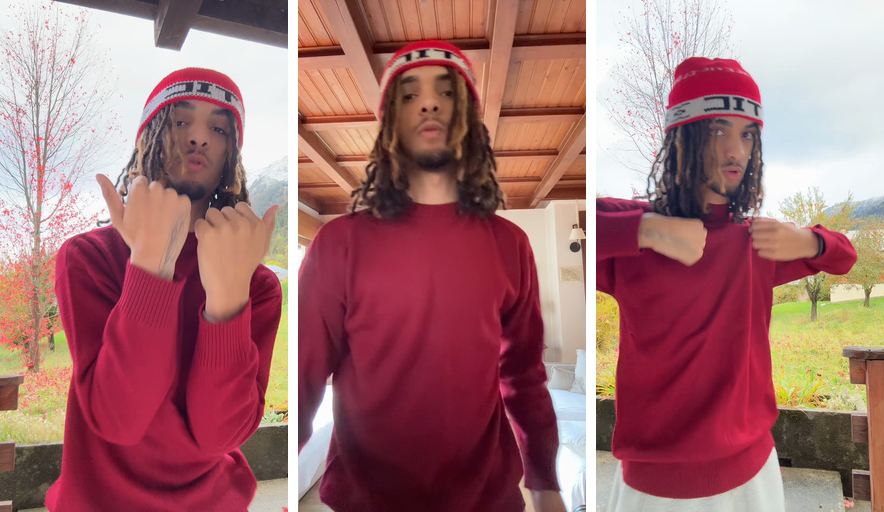
Before: 3 takes
After: Stalak’s edit
How do you do a perfect lip sync?
Perform the song instead of only moving your lips. Rap or sing every word out loud over the track, with the same breaths, pauses and energy as the recording. The camera sees your jaw, your throat and your chest, so a real performance reads as in sync.
- Learn the part by heart, ad-libs included.
- Breathe where the recording breathes: a breath in the wrong place shows.
- Hit the closed-mouth sounds, like P, B and M: that’s where people see the sync.
- Keep the song loud enough to hear it over your own voice.
How do you get good at lip syncing?
Practice in front of a mirror or the front camera, then watch the takes back with the sound on. Look at the closed-mouth sounds and the ends of lines: that’s where a lip-sync looks off first. Run the part a few times before you film for real.
- Film a test take and check it before moving to the next spot.
- On held notes, keep your mouth open as long as the note lasts.
- On fast verses, keep the mouth moves small and sharp.
Why does my lip sync look off?
Most of the time, the take sits a little early or late against the song, and a few frames are enough to see it. It happens when the video is placed by hand, or when you heard the song late while filming. Moving the take a frame or two fixes the first; a speaker fixes the second.
- Play the song from a speaker, not Bluetooth earbuds: their delay makes you perform a little late.
- If a line repeats in the song, a take can be lined up on the wrong one: check the lips on the chorus.
- In Stalak, each take has − and + to move it one frame earlier or later, and ⇄ to try the other spot when a part repeats.
Can you fix a lip sync that’s out of sync?
Yes, if the take was filmed over the same song. Line it up again with the audio, frame by frame, until the lips land on the closed-mouth sounds. If the performance itself drifts on a few bars, use another take there instead.
- In Stalak, tap a shot and Swap take to put another take at the same moment.
- Exclude this part stops a moment of a take from being used again, even when you shuffle.
Stalak in one minute
Here’s each step in Stalak at phone size, with the takes from the example above.
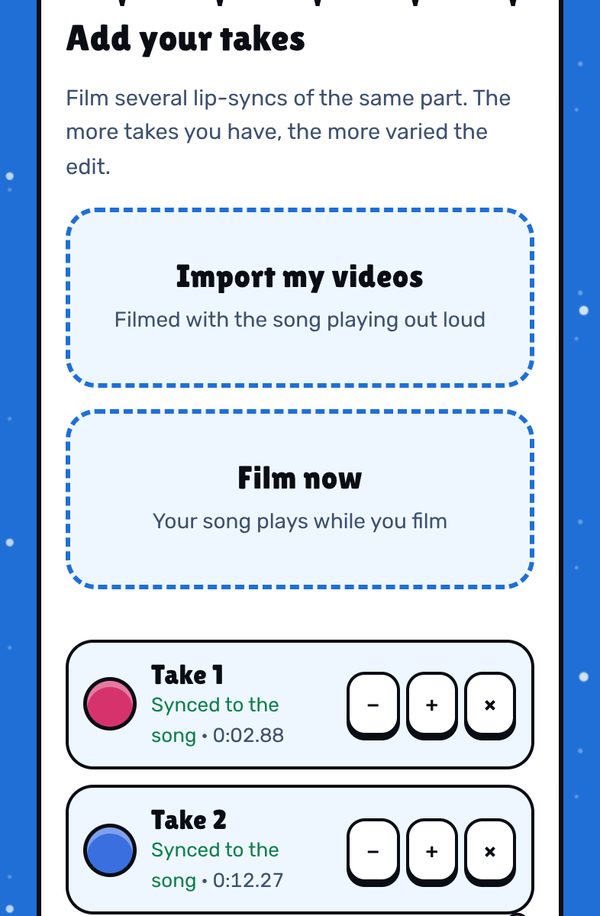
1. Add your takes. Stalak lines each one up with the song and shows “Synced to the song”. − / + move a take one frame earlier or later. 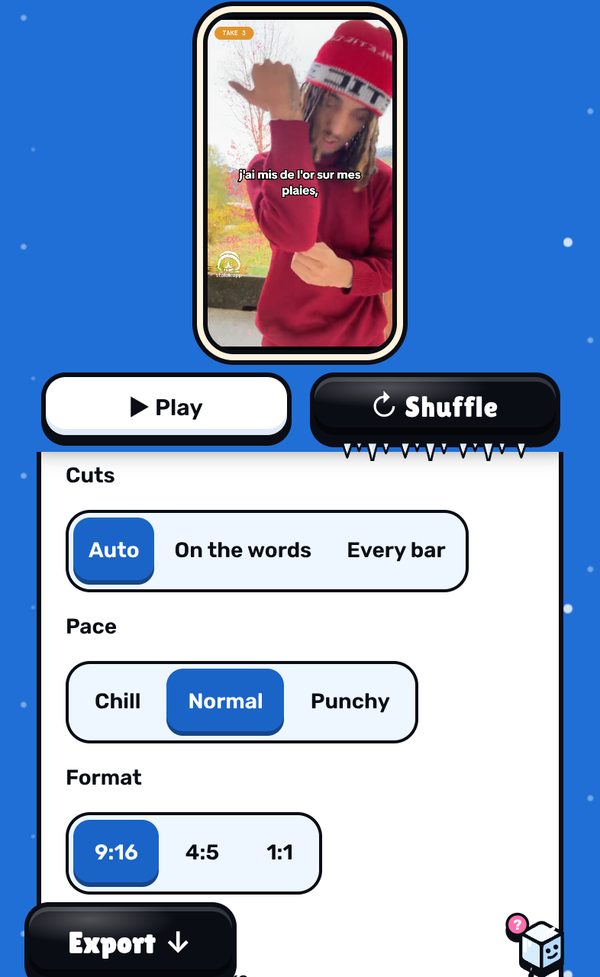
2. Check the lips. Play the edit and watch the closed-mouth sounds. If a shot doesn’t hold, swap the take, or exclude that part. 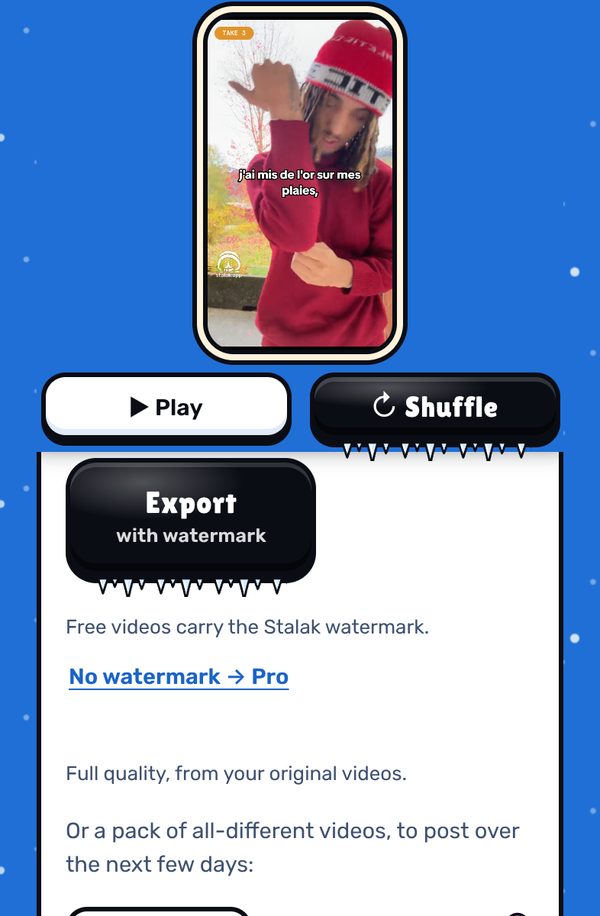
3. Export. The video is made on your device, in full quality from your original files, with your song as its sound.
Free, in your browser. No sign-up.
What’s free, what’s Pro
- Free: unlimited videos, auto cuts, lyrics one line at a time, 3 filters, 9:16 export, no ads. A small watermark (our mascot and stalak.app) on every video.
- Stalak Pro ($7.99/mo or $49.99/yr): no watermark, 16:9 music videos, karaoke and word-by-word lyrics, auto lyrics, all filters and premium effects.
- Creator Plus ($14.99/mo or $99.99/yr): everything in Pro, plus video packs, automatic cloud saving (100 GB) and “Talk to a human”.
FAQ
How do I lip sync on TikTok?
Film yourself performing the song with the track playing out loud, at full voice. To keep it in sync, film a few takes, line them up with the audio and cut between them on the beat before you post: that’s what Stalak does.
Why are my lips late in my video?
Often because you listened through Bluetooth earbuds while filming, or because the video was placed by hand. Play the song from a speaker next time, and move the take a frame or two earlier.
Is lip syncing hard?
Not when you know the song. Most of it is knowing every word and breathing where the recording breathes. Lining the video up with the audio is the technical part, and Stalak does it for you.
Is Stalak free?
Yes. Unlimited videos, no account and no ads. Free videos carry a small watermark (our mascot’s face and stalak.app); go Pro ($7.99/mo or $49.99/yr) to export without it.
Do my videos get uploaded?
No. Editing happens in your browser, on your device. The only exceptions, if you use them: cloud projects (Creator Plus, saved automatically) and the audio sent for auto lyrics (Pro).
Stalak is made by 99Sayso, an independent rapper from the Alaska collective. He coded it to cut his own takes to the beat.